
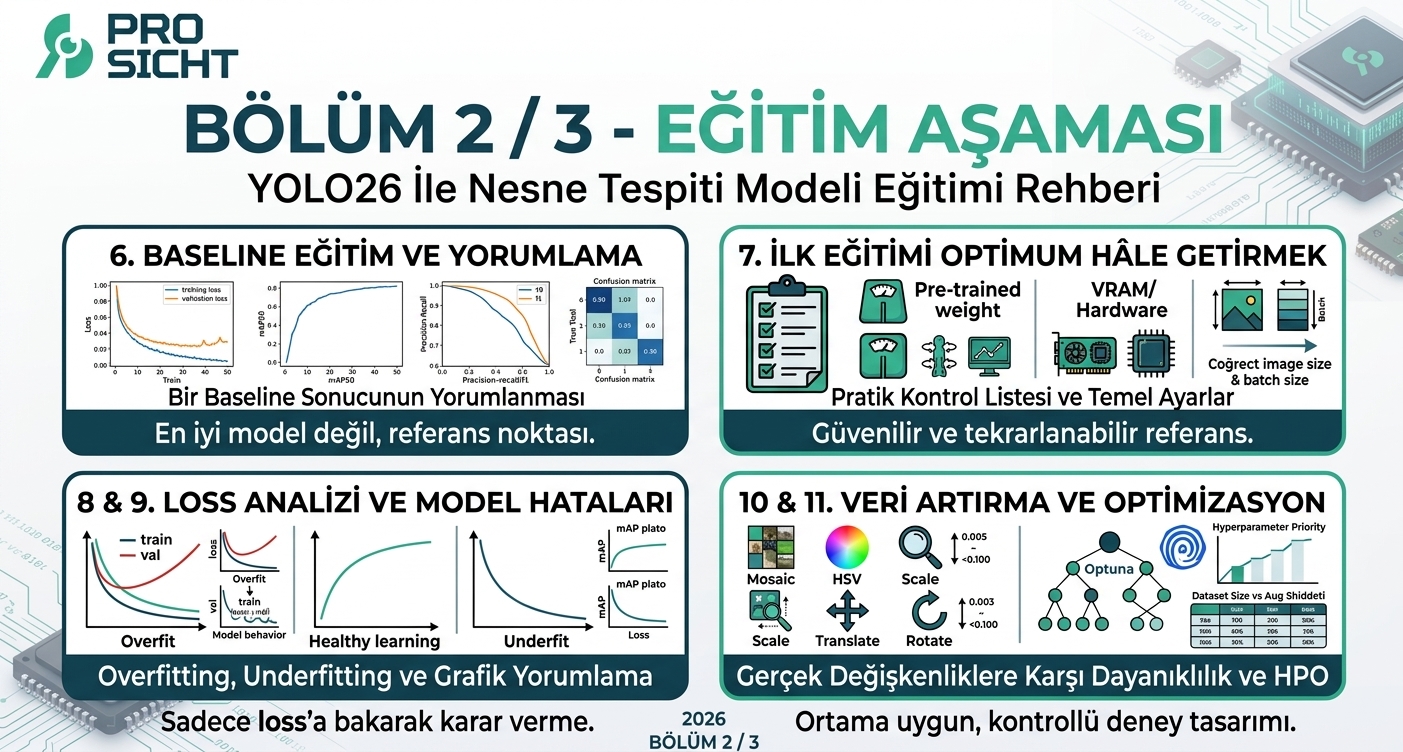
YOLO mimarisiyle nesne tespiti rehberimizin ikinci bölümüne hoş geldiniz. İlk yazımızda projemizi tanımlamış, veri setimizi analiz etmiş ve doğru modeli seçerek sağlam bir temel atmıştık. Artık teoriyi pratiğe dökme vakti geldi. Bu yazıda kolları sıvayıp; güvenilir bir baseline model eğitmeyi, elde ettiğimiz sonuçları bilimsel bir gözle yorumlamayı, kontrollü hiperparametre optimizasyonu yapmayı ve son olarak eğittiğimiz modeli hedef edge cihazda çalışmaya hazır hale getirmeyi adım adım inceleyeceğiz.
6. Baseline Eğitim
Hiperparametre optimizasyonundan önce standart ve mümkün olduğunca güvenilir bir baseline eğitim yapılmalıdır. Baseline'ın amacı en iyi modeli bulmak değil, sonraki deneylerin karşılaştırılabileceği referans noktayı oluşturmaktır.
Veriyi kontrol et ve temizle.
Train / val / test ayrımını oluştur.
Uygun YOLO26 varyantını seç.
Kurulu Ultralytics sürümünü doğrula.
Varsayılan veya önerilen eğitim ayarlarıyla baseline çalıştır.
Sonuçları kaydet: loss, mAP50, mAP50-95, precision, recall, F1.
Confusion matrix ve PR curve'ü incele.
Baseline sonuçlarını deney günlüğüne kaydet.
6.1 Örnek: Bir Baseline Sonucunun Yorumlanması
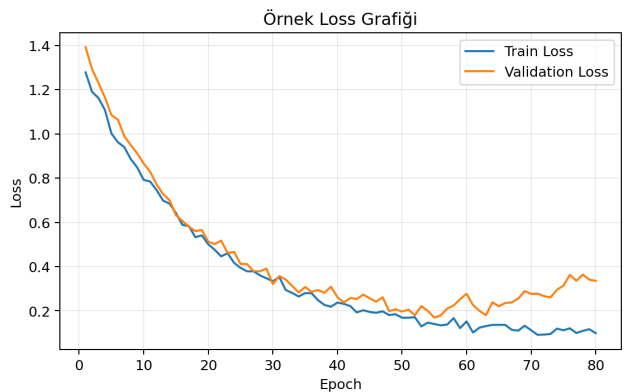
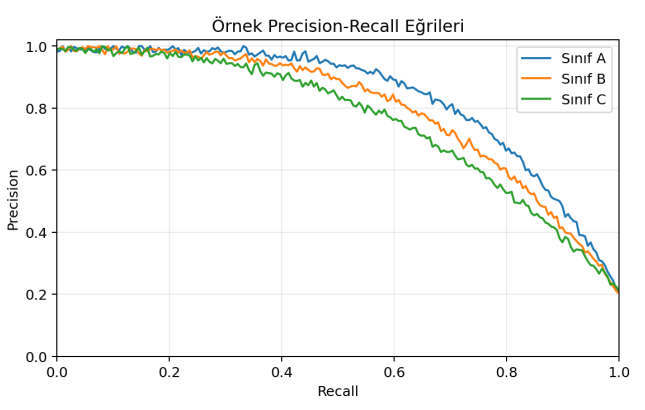
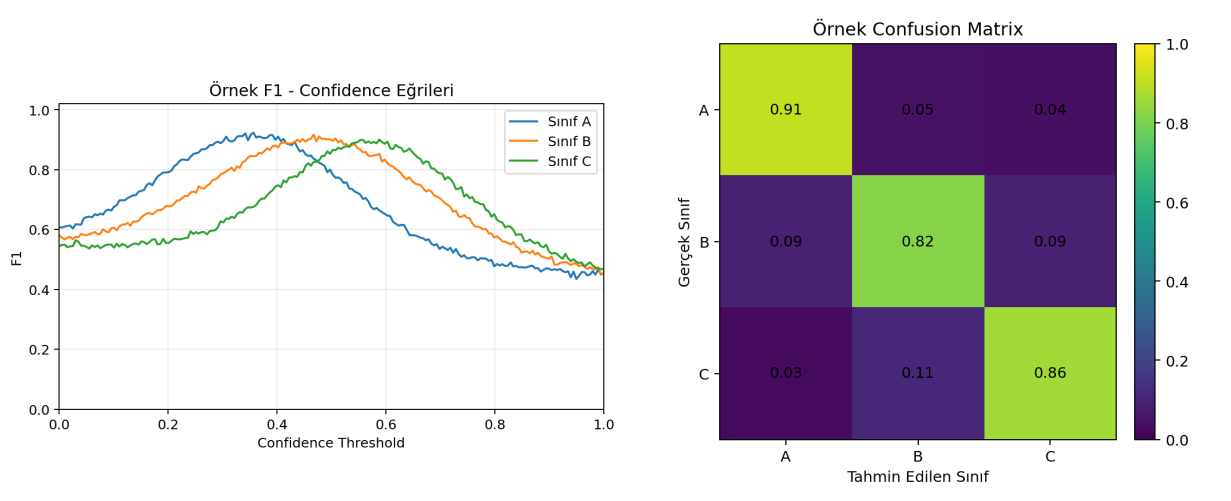
Bu bölümdeki grafik örnekleri tamamen temsili ve rastgele oluşturulmuş sonuçlardır; gerçek bir eğitim çıktısını temsil etmezler. Amaç; loss, precision-recall, F1-confidence ve confusion matrix grafiklerinin birbirleriyle birlikte nasıl yorumlanacağını öğretmektir. Örnek senaryoda üç sınıf (A, B ve C) bulunmaktadır; burada önemli olan sayısal değerlerden çok grafiklerin şeklinin ve sınıflar arasındaki farkların nasıl okunacağıdır.
Loss grafiğinde train loss'un epoch'lar ilerledikçe düzenli biçimde azalması öğrenmenin gerçekleştiğini gösterir. Validation loss da başlangıçta azalıyor ve daha sonra yataylaşıyorsa modelin genelleme performansı belirli bir noktada doygunluğa ulaşmış olabilir. Validation loss yükselmeye başlarsa overfitting ihtimali araştırılmalıdır.
Precision-recall eğrisinde eğrinin mümkün olduğunca sağ üst bölgede kalması istenir. Yüksek recall seviyelerinde precision'ın hızlı düşmesi, modelin daha fazla nesneyi yakalamaya çalışırken yanlış pozitif üretmeye başladığını gösterebilir. F1-confidence eğrisinde ise en yüksek F1 değerinin bulunduğu confidence seviyesi, uygulamaya göre eşik seçimi için başlangıç noktası olarak değerlendirilebilir.
Confusion matrix sınıf bazındaki hataların nerede yoğunlaştığını gösterir. Köşegendeki yüksek değerler doğru sınıflandırmaları, köşegen dışındaki değerler ise sınıflar arası karışmaları ifade eder. Örneğin B sınıfının önemli bir kısmı C olarak tahmin ediliyorsa, bu iki sınıfın görsel olarak birbirine benzeyen özellikleri ayrıca incelenmelidir.
Sonuç: Tek bir metriğe bakarak karar verilmemelidir. Loss grafiklerinin öğrenme davranışını, precision-recall eğrisinin hata dengesini, F1-confidence eğrisinin eşik davranışını ve confusion matrix'in sınıf bazındaki hataları göstermesi birlikte değerlendirilmelidir. Yüksek mAP tek başına yeterli değildir.
7. İlk Eğitimi Mümkün Olduğunca Optimum Hâle Getirmek
Baseline eğitim çoğu zaman elde edilebilecek en yüksek skoru bulmak için değil, sonraki bütün deneylerin karşılaştırıldığı güvenilir bir referans noktası oluşturmak için yapılır. Buna karşın, ilk eğitimin baştan itibaren mümkün olduğunca sağlıklı kurulması hem zaman kazandırır hem de sonraki yorumların doğru bir temele dayanmasını sağlar. Aşağıdaki maddeler, ilk eğitimi mümkün olduğunca optimum hâle getirmek için izlenebilecek pratik bir kontrol listesidir.
Önceden eğitilmiş ağırlıklarla başlayın: rastgele başlatılmış ağırlıklara göre transfer learning neredeyse her zaman daha hızlı ve daha kararlı bir yakınsama sağlar.
Görüntü boyutunu doğru seçin: görüntü boyutu (image size), veri setindeki nesnelerin gerçek boyutuna ve hedef cihazın işlem gücüne göre belirlenmelidir; gereksiz yere büyük bir boyut eğitim süresini uzatırken, gereğinden küçük bir boyut küçük nesnelerin görünürlüğünü azaltabilir.
Grup büyüklüğünü donanıma göre ayarlayın: grup büyüklüğü (batch size), kullanılan grafik kartının belleğine (VRAM) göre kararlı biçimde çalışabilecek en büyük değerde tutulmalıdır; aşırı küçük gruplar gradyanların gürültülü olmasına yol açabilir.
Öğrenme oranını değiştirmeden başlayın: öğrenme oranı (learning rate) ve ısınma (warmup) ayarlarını önerilen varsayılan değerlerle başlatın; ilk eğitimde bu ayarlarla oynamamak, sonucun neden değiştiğini daha sonra anlamayı kolaylaştırır.
Erken durdurmayı açık bırakın: epoch sayısını yeterince yüksek tutup erken durdurma (early stopping) mekanizmasını açık bırakın; böylece kaç epoch'un yeterli olduğu sorusuna varsayım yerine ölçümle cevap verilmiş olur.
Rastgelelik tohumunu sabitleyin: rastgelelik tohumu (seed) sabitlendiğinde, sonraki deneylerle yapılan karşılaştırmalar daha adil olur.
Karma hassasiyetli eğitimi değerlendirin: donanım destekliyorsa karma hassasiyetli eğitimi (mixed precision) açık tutmak, hem eğitim süresini kısaltır hem de bellek kullanımını azaltır.
Doğrulama ve kayıt sıklığını düzenli tutun: en iyi model her zaman doğrulama metriğine göre otomatik olarak kaydedilmelidir; bu sayede eğitim sırasında en iyi ara nokta kaybedilmez.
Augmentation ayarlarını ilk eğitimde sabit bırakın: augmentation ayarlarını önerilen varsayılan değerlerde bırakmak, baseline aşamasında hangi değişikliğin performansı etkilediğini daha sonra ayırt etmeyi kolaylaştırır.
Eğitim öncesinde kısa bir deneme çalıştırın: veri setinin küçük bir alt kümesiyle yapılan kısa bir deneme, veri yükleme, etiket eşleşmesi ve kod hatalarını, eğitim saatlerce sürmeden önce ayarlamanızı sağlar.
Donanım ve yazılım sürümlerini kayıt altına alın: kullanılan işlem kartı, işlemci ve yazılım sürümlerini (CUDA, PyTorch, Ultralytics) not almak, ileride yapılacak karşılaştırmalarda sürüm farkının etkisini göz ardı edebilmemizi sağlar.
Amaç: İlk eğitimde hedef en yüksek skoru elde etmek değil, güvenilir, tekrarlanabilir ve üzerine inşa edilebilir bir referans nokta oluşturmaktır. Bu referans olmadan yapılacak hiperparametre değişikliklerinin gerçekte bir iyileşme sağlayıp sağlamadığı anlaşılamaz.
8. Loss Grafiklerini Okuma
Loss grafikleri modelin öğrenme davranışını anlamak için önemlidir; ancak model kalitesi yalnızca loss değerine bakılarak belirlenmemelidir.
Gözlem | Olası Yorum |
|---|---|
Train loss ↓ ve validation loss ↓ | Genellikle sağlıklı öğrenme. |
Train loss ↓ ve validation loss ↑ | Overfitting ihtimali. |
Train ve validation loss yüksek ve yatay | Underfitting, yetersiz kapasite veya uygun olmayan eğitim ayarları. |
Loss çok dalgalı | Learning rate, batch size, veri kalitesi veya augmentation incelenmeli. |
Loss düşüyor fakat mAP platoya giriyor | Modelin optimizasyon hedefi ile gerçek performans arasında doygunluk oluşmuş olabilir. |
Kural: Loss azalması tek başına daha iyi model anlamına gelmez. mAP, precision, recall, F1 ve gerçek test performansı birlikte değerlendirilmelidir.
9. Overfitting ve Underfitting
9.1 Overfitting Belirtileri
Train performansı sürekli yükselirken validation performansı geriliyor.
Train loss düşerken validation loss yükseliyor.
Train mAP çok yüksek, validation mAP belirgin biçimde düşük kalıyor.
Model belirli görüntü koşullarında çok iyi, farklı koşullarda belirgin biçimde kötü çalışıyor.
9.2 Overfitting İçin Olası Çözümler
Daha çeşitli veri toplamak
Ortama uygun augmentation kullanmak
Early stopping uygulamak
Daha küçük model denemek
Eğitim süresini azaltmak
Weight decay ve diğer regularization seçeneklerini kontrollü incelemek
Train/validation ayrımını ve data leakage riskini tekrar kontrol etmek
9.3 Underfitting Belirtileri
Train ve validation performanslarının ikisi de düşük.
Loss değerleri yeterince iyileşmiyor.
Model eğitim verisinde dahi görevi yeterince öğrenemiyor.
Yaklaşım: Problemin nedenini belirlemeden model büyütmek veya augmentation artırmak doğru değildir.
10. Veri Artırma (Augmentation)
Augmentation'ın amacı veri sayısını yapay olarak artırmaktan çok, modelin gerçek dünyadaki değişkenliklere karşı daha dayanıklı olmasını sağlamaktır.
Mosaic: Farklı görüntüleri birleştirerek nesne ve bağlam çeşitliliği oluşturabilir.
MixUp: Görüntüleri karıştırarak regularization sağlayabilir; ancak her ortam için uygun değildir.
HSV: Aydınlatma ve renk değişimlerine karşı dayanıklılığı artırabilir.
Scale: Nesne boyutu değişimlerine karşı dayanıklılık sağlayabilir.
Translate: Nesnenin görüntü içindeki konumunun değişmesini simüle eder.
Rotation: Gerçek sistemde oluşabilecek açı değişimlerine uygun seviyede kullanılmalıdır.
Flip: Sadece gerçek kullanım senaryosunda fiziksel olarak mümkünse kullanılmalıdır.
Close Mosaic: Eğitimin son bölümünde gerçek görüntü dağılımına daha fazla yaklaşmak için değerlendirilebilir.
Ortam uyumu: Gerçek sistemde hiç görülmeyecek dönüşümleri agresif biçimde uygulamak, modelin gerçek dağılımla arasındaki farkı artırabilir.
10.1 Temel Augmentation Teknikleri ve Önerilen Değer Aralıkları
Aşağıdaki tablo, en sık kullanılan augmentation tekniklerini, tipik olarak kullanılan değer aralıklarını ve her birinin hangi amaca hizmet ettiğini özetlemektedir. Belirtilen aralıklar kesin kurallar değil, farklı görevlerde sıkça tercih edilen başlangıç noktalarıdır; kesin değerler her zaman veri setine ve hedef kullanım senaryosuna göre kontrollü deneylerle doğrulanmalıdır.
Teknik | Önerilen Değer / Aralık | Ne İşe Yarar |
Mosaic (mozaik birleştirme) | Olasılık ~1,0; eğitimin büyük bölümünde açık | Birden çok görüntüyü tek karede birleştirerek nesne ve bağlam çeşitliliğini artırır. |
Close Mosaic (mozaiği kapatma) | Eğitimin son 10-15 epoch'unda kapatılması önerilir | Eğitimin sonunda modelin gerçek görüntü dağılımına daha fazla yaklaşmasını sağlar. |
MixUp | Olasılık ~0,0-0,2 arası | İki görüntüyü karıştırarak hafif bir düzenlileştirme etkisi sağlar; hassas sınıf ayrımı gereken görevlerde önerilmez. |
Copy-Paste | Olasılık ~0,0-0,3 arası | Nesneleri farklı arka planlara yapıştırarak, örnek sayısı az olan sınıflarda çeşitliliği artırır. |
HSV - Renk Tonu (Hue) | ~0,0-0,02 arası | Küçük renk tonu kaymalarına karşı dayanıklılık sağlar. |
HSV - Doygunluk (Saturation) | ~0,4-0,9 arası | Farklı aydınlatma ve kamera koşullarındaki renk doygunluğu değişimlerini simüle eder. |
HSV - Parlaklık (Value) | ~0,2-0,5 arası | Aydınlatma şiddetindeki değişimlere karşı dayanıklılığı artırır. |
Döndürme (Rotation) | Genel kullanımda 0-15 derece arası | Kameranın veya nesnenin açısındaki küçük değişimleri simüle eder; sabit açılı sistemlerde 0'a yakın tutulmalıdır. |
Öteleme (Translate) | Görüntü boyutunun ~0,05-0,2'si kadar | Nesnenin görüntü içindeki konumunun değişmesini simüle eder. |
Ölçek (Scale) | ~0,3-0,9 arası | Nesnenin kameraya olan uzaklığına bağlı boyut değişimlerini simüle eder. |
Eğme (Shear) | Genellikle 0'a yakın | Perspektif eğilmesi belirgin olan sahnelerde hafifçe artırılabilir. |
Perspektif | Genellikle 0,0 | Yalnızca kamera açısı belirgin biçimde değişen sistemlerde küçük değerlerle denenmelidir. |
Yatay Çevirme (Fliplr) | Genellikle 0,5 olasılık | Yalnızca sahnenin sağ-sol simetrisi gerçek kullanımda da mümkünse uygulanmalıdır. |
Dikey Çevirme (Flipud) | Genellikle 0,0; kapalı | Çoğu gerçek dünya sahnesinde yukarı-aşağı çevirme fiziksel olarak anlamlı değildir. |
10.2 Veri Seti Büyüklüğüne Göre Augmentation Şiddeti
Augmentation şiddeti, veri setinin büyüklüğüne göre ayarlanmalıdır. Küçük veri setlerinde daha güçlü augmentation genellikle faydalıyken, büyük ve zaten çeşitli veri setlerinde aşırı augmentation öğrenmeyi yavaşlatabilir ve gereksiz hâle gelebilir.
Veri Seti Büyüklüğü | Augmentation Şiddeti | Açıklama |
Çok küçük (1.000 görüntüden az) | Güçlü | Mosaic, HSV ve ölçek değişimleri önerilen aralığın üst sınırına yakın tutulabilir; MixUp ve Copy-Paste gibi teknikler de değerlendirilebilir. |
Küçük - orta (1.000 - 10.000) | Orta | Önerilen aralığın orta noktasına yakın değerler makul bir başlangıç noktasıdır. |
Büyük (10.000 - 100.000) | Hafif - orta | Veri zaten çeşitli olduğundan agresif augmentation genellikle gereksizdir; aşırı augmentation öğrenmeyi yavaşlatabilir. |
Çok büyük (100.000'den fazla) | Hafif | Augmentation, gerçek dünyada karşılaşılması muhtemel küçük değişkenliklere odaklanacak şekilde sınırlı tutulabilir. |
10.3 Ortama Özgü Seçim İlkeleri
Gerçek sistemde hiçbir zaman karşılaşılmayacak bir dönüşümü eğitime eklemeyin; örneğin sabit ve dik açıyla çekim yapan bir kamera sisteminde geniş açılı döndürme veya perspektif değişimi eklemek, modelin gerçek dağılımdan uzaklaşmasına yol açabilir.
Yeni bir augmentation eklerken tek seferde yalnızca bir değişiklik yapın ve doğrulama metriklerini bir önceki deneyle karşılaştırın; aynı anda birden fazla augmentation değiştirildiğinde hangi değişikliğin etkili olduğu anlaşılamaz.
Augmentation gücünü kademeli olarak artırın; düşük değerlerden başlayıp doğrulama performansını izleyerek adım adım yükseltmek, aşırı augmentation'ın öğrenmeyi bozduğu noktayı görünür kılar.
Augmentation uygulandıktan sonra oluşan görüntülerin bir kısmını gözle inceleyin; etiketlerin görüntüyle birlikte doğru dönüştüğünden ve nesnelerin kare dışına taşmadığından emin olun.
Augmentation yalnızca eğitim verisine uygulanan bir tekniktir; doğrulama ve test verisi, gerçek kullanım koşullarını olduğu gibi yansıtmalı ve augmentation'dan bağımsız tutulmalıdır.
Pratik kural: Augmentation ayarlarını değiştirirken aynı anda yalnızca bir parametreyi değiştirin ve sonucu doğrulama metrikleriyle karşılaştırın; aksi hâlde performans değişiminin hangi augmentation'dan kaynaklandığını ayırt etmek mümkün olmaz.
11. Hiperparametre Optimizasyonu
Hiperparametre optimizasyonu, aynı anda çok sayıda parametreyi rastgele değiştirmek yerine model performansını etkileyen parametreleri kontrollü biçimde aramaktır.
11.1 Öncelik Sırası
Learning rate ve scheduler
Image size ve batch size
Augmentation gücü
Optimizer ve ilgili parametreler
Weight decay / regularization
Warmup ayarları
Diğer düşük etkili parametreler
11.2 HPO Yöntemleri
Yöntem | Uygun Kullanım |
Manuel / Grid Search | Az sayıda parametreyi hızlı karşılaştırmak için. |
Random Search | Orta büyüklükte arama alanlarında basit ve etkili başlangıç için. |
Ultralytics Tune | Hızlı ve entegre başlangıç için. |
Optuna | Deneme sayısını verimli kullanmak ve Bayesian/TPE tabanlı arama yapmak için. |
Ray Tune | Çoklu GPU veya paralel deney ortamlarında. |
Öneri: Küçük ve orta veri setlerinde önce az sayıda anlamlı deney yapılmalı; geniş arama ancak baseline ve problem davranışı anlaşıldıktan sonra uygulanmalıdır.
12. Deney Tasarımı ve Experiment Log
Her eğitim deneyi kayıt altına alınmalıdır.
Baseline | Varsayılan ayarlar | Referans oluşturmak | Metrikler kaydedilir | En etkili problemi belirle |
Exp-01 | LR değişikliği | Yakınsamayı iyileştirmek | Baseline ile karşılaştır | Devam / geri dön |
Exp-02 | Augmentation değişikliği | Genelleme | Val performansını incele | Devam / geri dön |
Exp-03 | imgsz değişikliği | Küçük nesne performansı | mAP + latency | Accuracy/FPS dengesi |
Deney kuralı: Bir deneyde mümkün olduğunca az değişken değiştirin. Böylece performans değişiminin hangi etkenden kaynaklandığı anlaşılabilir.
Modelimizi eğittik, metrikleri doğru okumayı öğrendik ve hiperparametreleri optimize ettik! Peki bu harika sonuçlar veren modeli gerçek bir donanıma nasıl aktaracağız? Model dışa aktarma (export) ve donanım hızlandırma adımlarıyla projemizi sahaya indireceğimiz 3. bölümü kaçırmamak için takipte kalın.